Vector images are images made from points and lines that form layers of a smooth image.
Unlike raster images that pixelize as you zoom in, you can zoom in as far as you want on a vector image and it remains smooth.
 |
| (https://en.wikipedia.org/wiki/Vector_graphics) |
Raster Images
Raster images are images made from pixels that make a more jagged image.
Pixilized images are more difficult to edit that vector images as you are modifying the pixels of the image, rather than the lines and points of vector images.
 |
| (http://vector-conversions.com/vectorizing/raster_vs_vector.html) |
The Pixel
The pixel is the smallest element that can make up an image.
They are only able to be one colour at a time, but there are so many close together that the colours mix.
 |
| (https://en.wikipedia.org/wiki/Pixel) |
Colour Depth
The bigger the colour depth, the more colours that can be used.
with 1 bit being 2 colours, 4 bit being 16, 8 bits are 256 and 24 bit is 16,777,216 or "true colour".
 |
| (http://www.ou.edu/class/digitalmedia/articles/images/scan0207a.gif) |

Colour Models
RGB (used digitally) which adds colour together to make white and CMYK (used in printing) which removes colour to make white.
 |
| (http://content.answcdn.com/main/content/img/CDE/RGB.GIF) |

Resolution
The bigger the resolution the more pixels that can be used while limited by the monitor's resolution. Meaning that a high resolution video on a low resolution monitor looks low quality, and a low resolution video on a high resolution monitor also looks low quality.
 |
| (https://upload.wikimedia.org/wikipedia/commons/f/f2/Resolution_illustration.png) |

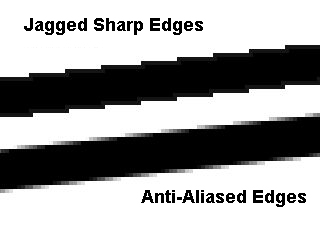
Anti-Aliasing
Used to smooth the jagged edges of bitmap images.
 |
| (http://www.build-your-own-computer.net/image-files/display-properties-03-aaexample.jpg) |
Aspect Ratio
How wide and tall the video/image is
 |
| (http://usercontent2.hubimg.com/7182855_f520.jpg) |

File Formats
The BMP file format, also known as bitmap image file or device independent bitmap file formator simply a bitmap, is a raster graphics image file format used to store bitmap digital images.
Portable Network Graphics (PNG) is a raster graphics file format that supports lossless data compression.
GIF (Graphics Interchange Format) is a creation of CompuServe and is used to store multiple bitmap images in a single file for exchange between platforms and systems. In terms of number of files in existence, GIF is perhaps the most widely used format for storing multibit graphics and image data.
TIFF stands for "Tagged Image File Format" and is a standard in the printing and publishing industry. TIFF files are significantly larger than their JPEG counterparts, and can be either uncompressed or compressed using lossless compression.
JPG is a file extension for a lossy graphics file. The JPEG file extension is used interchangeably with JPG. JPEG stands for Joint Photographic Experts Group who created the standard
A .PSD file is a layered image file used in Adobe PhotoShop. PSD, which stands for Photoshop Document, is the default format that Photoshop uses for saving data. PSD is a proprietary file that allows the user to work with the images' individual layers even after the file has been saved.
PDF (Portable Document Format) is a file format that has captured all the elements of a printed document as an electronic image that you can view, navigate, print, or forward to someone else. PDF files are created using Adobe Acrobat , Acrobat Capture, or similar products.
Encapsulated Postscript Vector graphics (Adobe Illustrator) EPS is a file extension for a graphics file format used in vector-based images in Adobe Illustrator. EPS stands for Encapsulated PostScript. An EPS file can contain text as well as graphics.
Adobe Illustrator Artwork (AI) is a proprietary file format developed by Adobe Systems for representing single-page vector-based drawings in either the EPS or PDF formats. The .ai file name extension is used by Adobe Illustrator.
Compression
Lossless compression reduces the file to smaller parts while lossy compression just dumps some of the information.
Image Capture Devices
Anything used to capture an image, like a camera, scanner, etc.
Optimizing
Resizing, cropping, changing file type, etc. Anything to make sure it works for what it is intended.
Storage And Asset Management
Hard-drives, portable drives (memory sticks, floppy disks), CD and DVD and cloud-based storage systems.
Portable Network Graphics (PNG) is a raster graphics file format that supports lossless data compression.
GIF (Graphics Interchange Format) is a creation of CompuServe and is used to store multiple bitmap images in a single file for exchange between platforms and systems. In terms of number of files in existence, GIF is perhaps the most widely used format for storing multibit graphics and image data.
TIFF stands for "Tagged Image File Format" and is a standard in the printing and publishing industry. TIFF files are significantly larger than their JPEG counterparts, and can be either uncompressed or compressed using lossless compression.
JPG is a file extension for a lossy graphics file. The JPEG file extension is used interchangeably with JPG. JPEG stands for Joint Photographic Experts Group who created the standard
A .PSD file is a layered image file used in Adobe PhotoShop. PSD, which stands for Photoshop Document, is the default format that Photoshop uses for saving data. PSD is a proprietary file that allows the user to work with the images' individual layers even after the file has been saved.
PDF (Portable Document Format) is a file format that has captured all the elements of a printed document as an electronic image that you can view, navigate, print, or forward to someone else. PDF files are created using Adobe Acrobat , Acrobat Capture, or similar products.
Encapsulated Postscript Vector graphics (Adobe Illustrator) EPS is a file extension for a graphics file format used in vector-based images in Adobe Illustrator. EPS stands for Encapsulated PostScript. An EPS file can contain text as well as graphics.
Adobe Illustrator Artwork (AI) is a proprietary file format developed by Adobe Systems for representing single-page vector-based drawings in either the EPS or PDF formats. The .ai file name extension is used by Adobe Illustrator.
Compression
Lossless compression reduces the file to smaller parts while lossy compression just dumps some of the information.
 |
| (http://www.websiteoptimization.com/secrets/advanced/9-8-http-compression-savings.png) |

Image Capture Devices
Anything used to capture an image, like a camera, scanner, etc.
 |
| (http://keyassets.timeincuk.net/inspirewp/live/wp-content/uploads/sites/13/2014/03/hs50exr_600.jpg) |

Optimizing
Resizing, cropping, changing file type, etc. Anything to make sure it works for what it is intended.
Storage And Asset Management
Hard-drives, portable drives (memory sticks, floppy disks), CD and DVD and cloud-based storage systems.
 |
| (https://i.ytimg.com/vi/JsubtxtHdLE/maxresdefault.jpg) |
